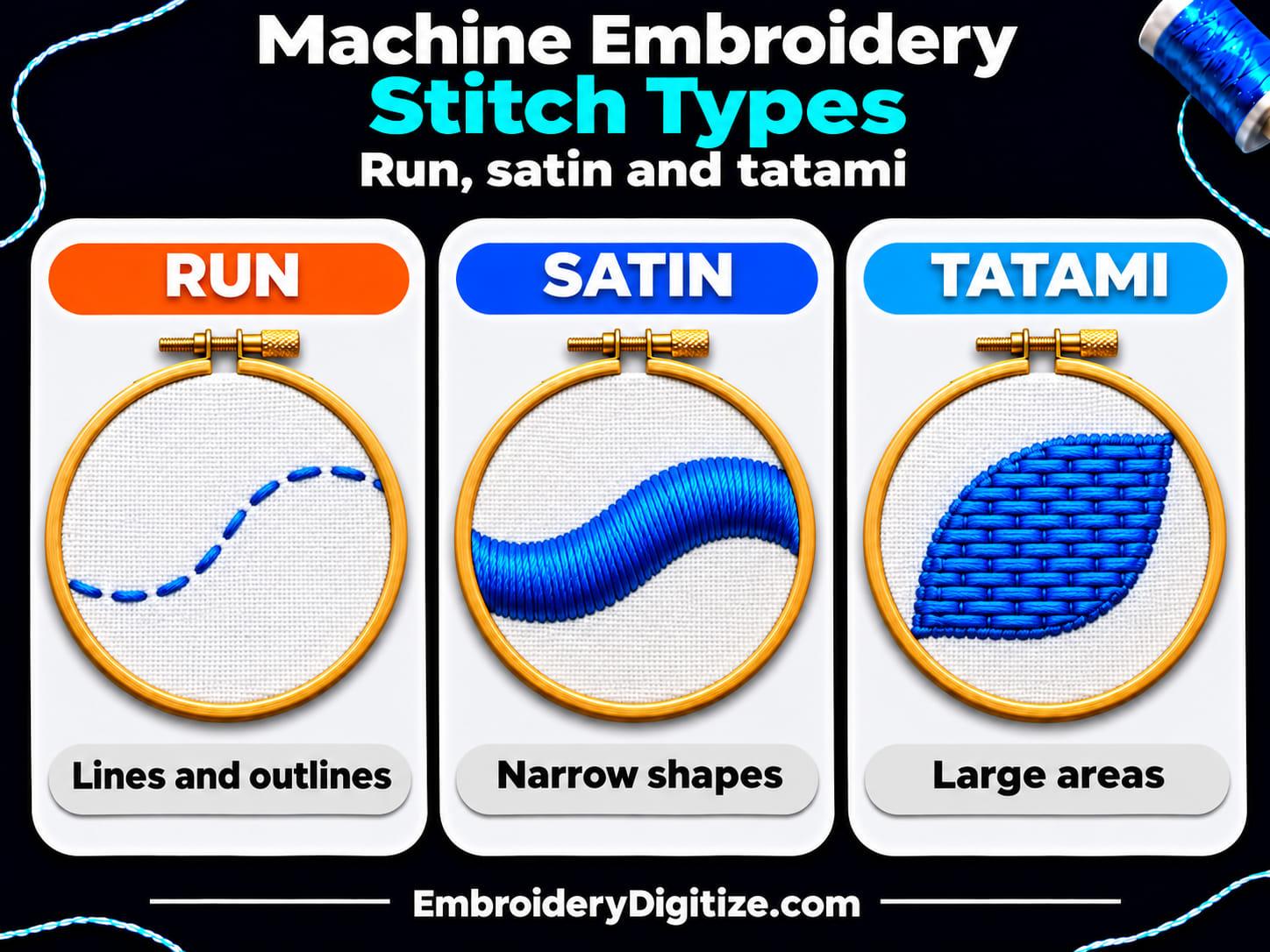
Quick answer: Machine embroidery designs are built from three basic stitch types: run stitch for lines and outlines, satin stitch for narrow shapes and lettering, and tatami (fill) stitch for larger areas. Programs add variants and use different names. Digitizing software stores the type as an object setting; a machine file such as DST generally stores only the resulting stitches.
A stitch type is the stitching method a digitizing program uses to turn a line or an area into stitches. Every line of lettering, border and filled area in an embroidery design is stitched as one type or another, and the choice changes how the thread looks, how dense it is and how many stitches it takes. This guide covers machine embroidery, not hand embroidery stitches. It explains the three basic types, the variants and specialty stitches that programs add, how to match a stitch type to a shape, what underlay is, and what happens to stitch types once a design is saved as a stitch file such as DST.
The facts come from the help pages and blogs of two digitizing programs (Wilcom EmbroideryStudio and Ink/Stitch), EduTech Wiki (a university wiki whose stitch type page is marked as a draft), a guide from a digitizing software company (Embroidery Legacy) and our own pages, all opened on November 23, 2026. We ran one small test with our own file viewer, described below. We did not stitch a sample or measure any setting. Sources disagree on some numbers and use different names, so treat the figures as starting points to test on your own fabric, thread and machine. EmbroideryDigitize sells digitizing services, which the last sections describe.
What Is a Stitch Type in Machine Embroidery?
In object-based digitizing software, many design elements are objects, and EduTech Wiki describes them as either lines or areas. It says: "Both areas and lines can be filled with various kinds of patterns, that we call stitch types." Wilcom's help calls stitch type the key setting of an object: "The most important property of all is stitch type." It explains that "The software uses object outlines and the associated stitch type to generate stitches", and that stitches are regenerated whenever you reshape, transform or scale an object.
Wilcom adds that stitch types "divide broadly into two categories – outlines and fills" and that "Different stitch types suit different shapes." In plain terms, the artwork gives the shape and the stitch type decides how thread covers it.
What Are the Main Machine Embroidery Stitch Types?
Wilcom's glossary says: "Three basic stitch types are available with lockstitch machines – Run, Satin and Tatami (Weave). EmbroideryStudio provides many variants of these." Embroidery Legacy, a digitizing software and design company, also names three primary types (running, satin and fill) and says "All other embroidery stitch types are simple variations of the three main stitch types listed above." Other sources count differently. EduTech Wiki lists five main types: manual, running, satin, fill, and programmable or specialty stitches. Ink/Stitch says its stitch types can be "roughly divided into three sections: stroke, satin and fill".
| Source | How it groups stitch types |
|---|---|
| Wilcom's glossary | Three basic types (run, satin and tatami), with many variants. |
| Wilcom's help | Two broad categories: outlines and fills. |
| Ink/Stitch | Three groups: stroke (outlines, line art and small details), satin and fill. |
| EduTech Wiki (a draft page) | Five main types: manual, running, satin, fill, and programmable or specialty stitches. |
| Embroidery Legacy | Three primary types (running, satin and fill). It says the rest are variations of these. |
In our reading, the counts differ because each source slices the same ideas differently. Wilcom's help splits stitch types by line or area, Ink/Stitch by how a path becomes stitches, and EduTech Wiki by what each stitch does, with manual and specialty stitches as groups of their own. None of them is the single correct count. The next table covers the three basics.
| Stitch type | What the sources say it is | Typical jobs | Watch for |
|---|---|---|---|
| Run (also called walk) | Wilcom's glossary says run stitch "places a single row of stitches along a digitized line." | Wilcom's glossary: "Run is generally used for stitching outlines and connector stitches." Embroidery Legacy adds fine detail, accent lines and tack-down lines for appliqué. | Ink/Stitch says "A simple repetition is most of the time too thin", so a line is often stitched as a bean stitch instead. Embroidery Legacy suggests stitch lengths between 1.25 mm and 7.0 mm. |
| Satin | Wilcom's glossary describes "closely arranged zigzag stitches". Wilcom's help says it is "well-suited to narrow shapes where each stitch spans the width of the column." | The glossary says it is "often used for lettering, outlining, and details". Wilcom's help says it gives a glossy, high-quality appearance. | Width. Wilcom's help: "If a Satin shape is too wide, stitches may be loose or fail to cover the fabric properly." In very narrow columns, "stitch density may be too great and needle penetrations damage the fabric". |
| Tatami (fill) | Wilcom's help: "Tatami stitch consists of rows of run stitches and is suitable for filling large shapes." Wilcom's glossary also calls it weave stitch. | Wilcom's blog: "Ideal for large fills, backgrounds, and shapes where a consistent and stable surface is required." | Wilcom's blog: "Less suitable for small, detailed areas." Embroidery Legacy says it "can drastically increase your stitch count". |
One naming trap: in the sources above, "fill stitch" usually means tatami or tatami-like rows, but Wilcom's glossary defines satin as a "Type of fill stitch." Ask what a digitizer means by "fill" before you compare notes or settings.
What Is a Run Stitch, and What Are Triple Run and Bean Stitches?
Run stitch is the simplest type: one row of stitches along a line. Wilcom's glossary says it is "generally used for stitching outlines and connector stitches", and Embroidery Legacy lists more jobs, including fine detail, accent lines, quilting and trapunto effects, fur texture and tack-down lines for appliqué.
A single row can look thin. Ink/Stitch says "A simple repetition is most of the time too thin, so that the running stitch is usually executed as a bean stitch instead", which "makes the line wider and more distinct." In Ink/Stitch, a bean stitch value of 1 "repeats each stitch three times (forward, back, forward)." Wilcom's help describes the same count for its Triple Run: "By default, Triple Run repeats each stitch three times." It suggests Triple Run for emphasis and Sculpture Run, which alternates single and triple stitching, for a hand-stitched look. Embroidery Legacy calls a triple running stitch "often called bean stitch". So bean stitch and triple run are different program names for a similar idea.
Stitch length matters too. Wilcom's help suggests shorter stitches on sharp curves (it gives 1.8 mm as an example) so that the stitches follow the line more closely, and longer ones, around 4.0 mm in its example, for a hand-made look. Embroidery Legacy gives its own general range of 1.25 mm to 7.0 mm and warns that anything smaller than 1.25 mm is "almost like stitching on top of itself". These are one vendor's suggestions, so test them on your fabric.
What Is Satin Stitch, and How Wide Can It Be?
Satin stitch lays close zigzag stitches across a narrow shape so that each stitch spans its width. Wilcom's glossary explains that "there are generally no needle penetrations breaking up the fill", so satin stitch "creates a glossy effect." Ink/Stitch says satin stitch "is used for borders, letters or small fill areas." Variants include raised satin, which Wilcom's help says builds "multiple satin layers" and "uses a lot more stitches", and Auto Split, which Wilcom's help says "can also be used as an alternative to tatami fill."
Here, width means how far a satin stitch spans across one stitched column, not the total width of a letter or design. The sources give different width limits, so read them as ranges to test, not rules.
| Source | What it says about satin width |
|---|---|
| Wilcom's blog (March 2026) | Says the "recommended maximum width is around 10 mm, although Satin Stitch can extend up to 12 mm in some situations." |
| Wilcom's help, raised satin | "Raised Satin is best applied to objects 7mm wide or less." |
| Embroidery Legacy | Never above 10 mm for large areas. For clothing, "never use a satin stitch larger than 7 mm". Also: "Try not to create satin lines or objects less than 2mm wide". |
| Our satin stitch vs fill stitch guide | About 7 to 10 mm wide for narrow shapes such as lettering, outlines and borders. |
These figures apply to different uses. Wilcom's 7 mm is for raised satin and Embroidery Legacy's 7 mm is for clothing, while Wilcom's blog says wider stitches, up to 15 mm, are possible but increase the risk of thread snagging. Suitability depends on the design, fabric, thread, machine and settings, so test your own. For the full width discussion, see our guide to satin stitch vs fill stitch.
What Is Tatami Stitch, and Is It the Same as Fill Stitch?
Tatami is the classic fill. EduTech Wiki says "The classic fill stitch is a so-called tatami stitch (named after the structure of Japanese mats)." Wilcom's help says tatami "consists of rows of run stitches", and that "Stitch offsets in each row are used to eliminate horizontal split lines." Density comes from row spacing: "Tatami stitch density is determined by the distance between each row of stitches." Wilcom's blog says tatami gives "a textured surface with lower thread density compared to Satin Stitch."
Tatami has limits. Wilcom's help says "tatami is flat and can show unwanted patterns with tight curves." Embroidery Legacy says to use it on larger objects and "never small spots or lines", and that "It does poorly on lines, and you will end up with too many stitches." So tatami is the usual answer for large areas, and often the wrong one for thin shapes. The answer to the question in the heading is: usually yes in everyday use, but a digitizer may use "fill" more broadly, as the naming note above explains.
What Other Stitch Types Do Digitizing Programs Offer?
Programs add outline stitches, decorative fills and effects to the three basics. Wilcom's help says it provides "many techniques for embellishing the basic stitch types", and that some "are treated as stitch types in their own right". Its Specialty stitching page lists 13 effects, and Ink/Stitch's stitch library lists 17 entries in three groups (our counts). The table shows a sample of what each program documents. It is not a ranking, and the names are the programs' own.
| Stitch or effect | What the documentation says | Program |
|---|---|---|
| Backstitch and stemstitch | "Backstitch is an older-style, adaptable stitch which can be used for delicate outlines." Stemstitch is "thicker and can be used to mimic hand-sewn embroidery". | Wilcom |
| Zigzag, E stitch and square | Open borders and columns that "can be used to create borders around appliqués and other embroidery objects". | Wilcom |
| E-stitch | "E-stitch is a simple but strong stitch used to hold appliques." | Ink/Stitch |
| Program Split | Makes "decorative fill stitches where needle penetrations form a tiled pattern". | Wilcom |
| Contour and circular fills | Wilcom's curved stitches "follow the contours of a shape". Ink/Stitch's contour fill "creates stitches that follow the contour of a shape" and its circular fill "creates an embroidered spiral that fills a shape". | Wilcom, Ink/Stitch |
| Stipple and meander | Wilcom's stipple makes "textured fills of run stitching which meanders more or less randomly within a border". Ink/Stitch's meander fill "creates a quilting style meandering pattern that covers large areas with a lighter, decorative texture." | Wilcom, Ink/Stitch |
| Gradient and blend fills | Wilcom's Accordion Spacing can "Vary stitch spacing between dense and open fill, producing gradient and shading effects." Ink/Stitch's linear gradient fill "creates a gradient like transition". | Wilcom, Ink/Stitch |
| Cross stitch | Wilcom: "Fill large areas with cross stitching on an invisible grid that applies to all design objects." Ink/Stitch: "Cross stitch mimics traditional hand embroidery techniques." | Wilcom, Ink/Stitch |
| Manual stitch | Ink/Stitch: "Manual stitch creates stitches using each node of a path as a needle penetration point." EduTech Wiki says manual stitches are mostly used to fix some automatically generated stitches. | Ink/Stitch, EduTech Wiki |
You do not need to know these names to order a design. They help when you read a digitizer's notes or compare software, because EduTech Wiki points out that terminology is similar across programs but differs in the details. Embroidery Legacy goes further and says everything beyond run, satin and fill is a variation of those three. That is a simplification: Wilcom's help treats some of its decorative techniques as stitch types in their own right, as quoted above.
Is Underlay a Stitch Type?
Underlay is a foundation, not a surface stitch. Wilcom's glossary defines it as "Stitches sewn before other design elements to help stabilize fabrics", made of "a series of single run stitches, usually with a very short stitch length", placed "under the column (satin) or fill stitch areas". Wilcom's help adds that "Zigzag and double zigzag stitches are also frequently used as underlays." Ink/Stitch says it "supports three kinds of underlay": center-walk, contour and zig-zag. Our guide to embroidery underlay covers the types and settings, and our guide to pull compensation covers the other setting that keeps shapes from shrinking in thread.
Which Stitch Type Should You Use for Each Part of a Design?
Wilcom and Embroidery Legacy each describe the same three jobs: lines get run stitches, narrow shapes get satin and large areas get tatami. Ink/Stitch groups its stitches the same way, as stroke, satin and fill. The table keeps each source's own words, because the limits differ.
| Part of the design | Stitch types the sources point to | What the sources say |
|---|---|---|
| Thin line or outline | Run, triple run or bean | Ink/Stitch: "Stroke stitches can be used for outlines, line art or to add small details." Embroidery Legacy: "Accent lines: running stitch or triple running stitch (often called bean stitch)". |
| Lettering and narrow columns | Satin | Embroidery Legacy: "Lettering: satin stitch up to 7 mm wide". It also lists medium-sized lettering among the jobs for run stitch. Check width limits in the table above. |
| Patch borders and thicker outlines | Satin | Embroidery Legacy: "Patch or borders: satin stitch". Wilcom's help says its satin outline tool creates "thicker borders or columns of even thickness". See our patch digitizing guide. |
| Large solid areas and backgrounds | Tatami | Wilcom's help: "suitable for filling large shapes". Embroidery Legacy: "Fill: tatami or, in smaller cases satin". |
| Small filled shapes and fine detail | Satin, or run stitch for fine detail, rather than tatami | Wilcom's blog says tatami is "Less suitable for small, detailed areas." Embroidery Legacy says tatami should not be used for "small spots or lines", and lists "Fine detail work and accent lines" among the jobs for run stitch. |
| Light, open texture | Stipple or meander | Ink/Stitch says meander fill covers "large areas with a lighter, decorative texture." It adds that "Large areas can be filled with relatively few stitches." |
| Appliqué edges | E-stitch, zigzag or run for tack-down | Ink/Stitch's E-stitch is "used to hold appliques." Embroidery Legacy lists "Placement or tack down lines for applique and more" under run stitch. |
A real design usually mixes types. Our satin vs fill guide says: "Most real logos use both stitch types." Fill covers the large shapes, and satin and run stitches handle borders, lettering and lines.
Why Does Stitch Type Matter for Quality and Stitch Count?
- Look and coverage. Wilcom's help says satin gives a glossy, high-quality appearance, and Wilcom's blog describes tatami as flat and textured.
- Stitch count. Wilcom's help notes that "An increased stitch count means the design will take longer and be more expensive to stitch." That is about the time and cost of stitching the design. What a digitizing service charges depends on that service's own pricing. Embroidery Legacy warns that tatami "can drastically increase your stitch count", and says you can adjust its length and density. Our guide to stitch count explains why the number matters.
- Problems from a poor match. A satin column that is too wide may be loose, one that is too narrow may be too dense, and tatami on a thin line can add too many stitches, according to the sources quoted above. Dense stitching is also one of the causes in our guide to embroidery puckering.
Does a Stitch File Keep the Stitch Types?
Usually not as such. Wilcom's help center explains that an EMB design file "stores the complete embroidery design", including object outlines, stitch data and stitch settings, while a machine file contains "the stitch coordinates, color changes, and machine commands required to stitch a design, but they generally do not include the original design objects or editing information." Wilcom's glossary lists DST as a "Machine file format native to Tajima machines", and Wilcom's help says that when machine files are read into EmbroideryStudio, they "do not contain object information such as outlines or stitch types."
| Design file (EMB in Wilcom's software) | Machine file (DST is one) | |
|---|---|---|
| What it holds, per Wilcom | Object outlines, stitch data, thread colors, stitch settings and more. | Stitch coordinates, color changes and machine commands. |
| Stitch types | Stored with the objects. Wilcom's glossary says that when a design file is opened, "corresponding stitch types, input methods and effects are applied." | Not stored as objects. Software can try to recognize them from the stitches. |
| Resizing | Wilcom's glossary: design files "can be scaled, transformed and reshaped without affecting stitch density or quality." | Wilcom's help: if no object recognition is used, "the stitch count remains unchanged as the design is resized", and it advises avoiding resizing stitch-only machine files "by more than approximately ±10%". |
Some software can work the types out again. Wilcom's help says it can "recognize" outlines, stitch types and spacing from stitch data "with some success", that "Stitch types are assigned as Satin, Tatami, or Program Split depending on the pattern of needle penetrations", and that recognition "cannot produce the same level of quality as original outlines and may not handle some fancy stitches." So the type is inferred from the stitch pattern, not read from a stored setting, and the rebuilt result can differ from what the digitizer originally set. Wilcom also advises: "Whenever possible, keep an original EMB version of every embroidery design." Our guide to embroidery file formats explains the two kinds of file, and the DST file viewer guide shows how to check one.
Does Our File Viewer Show Stitch Types? A Synthetic-File Test
In one synthetic DST test, our viewer drew distinct line, column and block patterns but did not name their stitch types. On November 23, 2026 we built one synthetic DST file with a short script, loaded it into our free embroidery file viewer and read what the page reported. The file has three elements with a color change between them. It is not a real design and we did not stitch it.
| Element we built | What the viewer drew |
|---|---|
| A run-style line: 10 stitches of 3.0 mm along a 30 mm line | A thin line |
| A satin-style column: 20 mm long and 4 mm wide, 100 zigzag stitches across the width | A band of close, slanted stitches |
| A tatami-style block: 20 mm by 8 mm, rows 0.4 mm apart, 4 mm stitches, 125 stitches | Rows of stitches filling the block |
The viewer's side panel listed the format (DST), the size (30.0 mm × 20.0 mm), 235 stitches, 3 thread colors, 6 jumps and 0 trims, and a stitch count for each color (10, 100 and 125). The panel labels the colors as stand-ins: "DST files don't store thread colors, so these are stand-ins." It did not name any stitch type. The three elements look different in the preview, so a zoomed-in preview can hint at the type, but the file itself does not say which type made each stitch. This is one synthetic file in one viewer. It shows what our viewer reports, not what other software can recover. It did not validate stitch-type recognition, machine compatibility, thread coverage or finished embroidery quality, and a preview cannot tell you how the stitches will sew.
What Should You Tell a Digitizer About Stitch Types?
You do not have to name stitch types to order a file. Our service page says: "Tell us the garment, fabric and machine in your order instructions and we optimise the file for them." Those details help a digitizer prepare the file, and a sample stitch-out is still how you check it. Details that help any digitizer:
- Where the design will be used, such as left chest, cap front or a patch, and its finished size.
- The fabric and the machine format you need, such as PES or DST.
- Any fine lettering or thin lines you care about, so they can be planned for.
- Whether you may need to resize or edit the design later. If so, ask whether an editable design file can be provided with the machine file.
- Who will do a real-size sample stitch-out before production, especially for fine lettering or difficult fabric.
If you already have a stitch file and only need another machine format, use our free embroidery format converter. For the buyer's side of ordering a file, see our guide to logo digitizing for small business, and for the whole process see what embroidery digitizing is.
What Mistakes Cause Stitch Type Problems?
- Using tatami on thin lines. Embroidery Legacy says "It does poorly on lines, and you will end up with too many stitches."
- Making satin too wide. Wilcom's help says stitches "may be loose or fail to cover the fabric properly". Embroidery Legacy says wider satin on clothing can snag.
- Making satin too narrow. Wilcom's help says needle penetrations can "damage the fabric" when the density is too great.
- Opening a fill too far. Wilcom's help says that if tatami spacing is too open, "travel runs and overlapping segments spoil the effect".
- Resizing a stitch-only file by a lot. Wilcom's help advises staying within about ±10%, because the stitch count does not change.
- Trusting the screen alone. Embroidery Legacy says "Always do a stitch out!" and notes that "your design might look good on your screen".
Frequently Asked Questions
What are the basic types of machine embroidery stitches?
Run, satin and tatami, according to Wilcom's glossary. Embroidery Legacy names the same three as running, satin and fill. Programs add many variants, and other sources count five main types by adding manual and specialty stitches.
What is the difference between satin stitch and fill stitch?
Satin stitch lays close zigzag stitches across a narrow shape, which gives a glossy look. Fill stitch, usually tatami, covers larger areas with rows of shorter stitches. Wilcom's glossary also calls satin a type of fill stitch, so confirm what is meant. See our satin vs fill guide for widths and examples.
What is tatami stitch?
Tatami is the classic fill stitch, made of rows of run stitches that fill a shape. EduTech Wiki says the name comes from the structure of Japanese mats. Wilcom's glossary also calls it weave stitch.
Is tatami the same as fill stitch?
Often. Embroidery Legacy gives tatami as its example of a fill stitch, and EduTech Wiki calls tatami the classic fill stitch. Wilcom's glossary lists "Fill stitch" and "Tatami stitch" as separate terms, so a digitizer may use "fill" more broadly.
What is a bean stitch?
A running stitch that repeats each stitch to make a thicker line. In Ink/Stitch, a bean value of 1 repeats each stitch three times (forward, back, forward). Embroidery Legacy says a triple running stitch is often called a bean stitch.
What stitch is best for lettering?
Satin is the usual choice for lettering. Wilcom's glossary says it is often used for lettering, and Embroidery Legacy suggests satin up to 7 mm wide. It also lists medium-sized lettering among the jobs for run stitch. Sources differ on limits, so sew a test of your own lettering.
What stitch is used for outlines?
Run stitch is the usual outline stitch, and Wilcom's help suggests Triple Run for emphasis. For thicker borders, Wilcom's help has a satin outline tool. Embroidery Legacy lists running, triple or satin stitch for smaller object outlines.
How many embroidery stitch types are there?
It depends on how you count. Wilcom's glossary names three basic types with many variants, EduTech Wiki names five main types, and Ink/Stitch's stitch library lists 17 entries (our count). Hand embroidery has its own long list of stitches, which this guide does not cover.
Can I change the stitch type in a DST file?
Not directly, because a machine file generally holds only stitch coordinates and machine commands. Software such as Wilcom's can try to recognize the stitch types and rebuild editable objects, but Wilcom says the result may not match the original design. An editable design file or a new digitized version is the more reliable route.
Does stitch type change the stitch count and cost?
Yes. Different stitch types and settings can produce different stitch counts for the same shape. Wilcom's help says a higher stitch count means the design takes longer and costs more to stitch, and Embroidery Legacy says tatami can drastically increase stitch count. That is the cost of stitching the design. What a digitizing service charges depends on its own pricing. Our guide to stitch count explains how the number is used.
Which stitch holds an appliqué in place?
Ink/Stitch says its E-stitch is used to hold appliqués. Wilcom's help says zigzag, E stitch and square stitches can make borders around appliqués, and Embroidery Legacy lists tack-down lines among the jobs for run stitch. Follow your software's or digitizer's method for your design.
Do all embroidery programs use the same stitch names?
No. EduTech Wiki says terminology is similar but differs in the details. Wilcom's glossary also lists alternative names, such as walk stitch for run stitch and weave stitch for tatami, and Ink/Stitch says bean stitch where Wilcom's help says Triple Run.
Can a viewer show which stitch types a design uses?
Not by name, in our test. Our viewer drew our test file's line, column and block differently and listed size, stitches, colors, jumps and trims, but no stitch types. A zoomed-in preview can hint at the type from the stitch pattern.
Is underlay a stitch type?
It is a foundation layer made of stitches, usually run stitches, sewn under satin or fill areas. Wilcom's glossary describes it that way, and our underlay guide covers the types.
Final Thoughts
Machine embroidery stitch types come down to a short list: run for lines, satin for narrow shapes and lettering, and tatami for large areas, plus variants that programs name in their own ways. The limits on width and length differ between sources, so sew a test on your own fabric before a production run. Remember that a machine file generally keeps the stitch instructions, not the editable stitch types and settings, so keep an editable design file if you might resize or edit the design later.
For the settings behind each stitch, see our guides to satin vs fill stitch, underlay and pull compensation.
Sources and Further Reading
Facts about stitch types come from the pages below, which we opened on November 23, 2026. This guide is a documentation-based explainer. Its one test used a synthetic DST file in our own viewer. We did not test a physical embroidery machine, stitch a sample or compare the results with other software. Features, advice and numbers can change, and some pages are older or marked as drafts, so check each page before you rely on it. Wilcom, EmbroideryStudio, Ink/Stitch, EduTech Wiki and Embroidery Legacy are names of their respective owners. EmbroideryDigitize is not affiliated with them, and the names appear only to show where each fact comes from.
- Wilcom EmbroideryStudio help (version 28): Stitch Types, Simple run stitching, Stitch length settings, Run count setting, Satin stitching, Apply satin stitch with auto spacing, Apply satin stitch with fixed spacing, Raised satin, Tatami stitching, Tatami density, Decorative embroidery, Decorative outlines, Border stitching, Patterned stitching, Curved stitching and Specialty stitching.
- Wilcom EmbroideryStudio help (version 28), machine files: Machine files, Open machine files and Object recognition, plus the glossary.
- Wilcom Help Center: Understanding embroidery files (the page shows "Updated: 3 months ago").
- Wilcom blog: Embroidery Stitch Techniques (March 18, 2026).
- Ink/Stitch documentation: Stitch Library, Running Stitch / Bean Stitch, E-Stitch, Meander Fill and the stitch types tutorial transcript.
- EduTech Wiki: Embroidery stitch type (marked as a draft by the wiki).
- Embroidery Legacy: Machine Embroidery Stitch Types Made Easy: From Novice to Pro (published August 2025, updated March 2026).
- Related on embroiderydigitize.com: our embroidery digitizing page, file viewer and format converter, and the guides to satin vs fill stitch, underlay, pull compensation, stitch count, file formats, the DST file viewer, patch digitizing, puckering, logo digitizing for small business and what embroidery digitizing is.
Need a Logo or Image Digitized?
Turn your logo, artwork, or custom design into a production-ready embroidery file.
Create your free EmbroideryDigitize account and submit your artwork, required size, garment type, and preferred embroidery format, such as PES or DST.
Existing customer? Login here.
If you already have an embroidery file but need another machine format, use our Free Embroidery Format Converter to convert supported embroidery files online.